You know the moment. The new build lands on your phone, you open it, and there’s your screen. Almost.
The card corners are sharper than you drew them. A bold 24 became a medium 21. The loading state is a spinner nobody designed, because there was never a frame for it. And every heading sits a couple of pixels lower than in your file.
Nobody did anything wrong. Your developer rebuilt your design from a picture of it, and pictures leave things out. So a fix ticket goes back to development, a new build comes back for review, and the Figma to Flutter handoff goes around one more time.
Most advice on this is about getting from Figma to Flutter faster. We’d ask a different question: why does your team build every screen twice?
Figma can’t export Flutter on its own, so teams rebuild screens by hand, run a converter, or point an AI agent at Figma’s MCP server. Each route starts from a picture of the app and has to run again whenever the design changes. The alternative is to design on the Flutter app itself, which is what Nowa is built for.
Can Figma export to Flutter?
Not by itself, as of October 2026:
- Dev Mode shows code snippets for CSS, iOS and Android. There’s no Flutter option.
- Code Connect, which maps Figma components to the ones in your codebase, has integrations for React, SwiftUI, Compose and a few others, but not Flutter. You can hand-write templates that show Dart snippets in Dev Mode, but that labels components. It doesn’t build screens.
- Figma’s MCP server, the bridge an AI agent uses to read your designs, returns React and Tailwind by default. Figma’s own docs say it “isn’t designed to return production-ready code.”
So every Flutter team builds its own bridge, usually one of these four.
Four ways to go from Figma to Flutter
Rebuild it by hand
A developer reads the values in Dev Mode and rebuilds every screen. It produces the cleanest code and takes the longest, and details quietly change on the way.
Figma to Flutter code converters
Figma-to-code plugins generate Flutter from a frame. As Very Good Ventures, a well-known Flutter consultancy, puts it, plugin-based tools “produce literal code without theme awareness, test coverage, or documentation.” Someone still has to clean it up and wire it in.
AI agents and Figma’s MCP
Point Claude Code or Cursor at Figma’s MCP server and ask for Flutter. It’s the best version of conversion so far, but it isn’t solved. “I’ve tried pasting screenshots, converting Figma files to PDF, direct MCP access to Figma files. None of them are very reliable,” one developer wrote on the Flutter forum. Very Good Ventures built a careful fix with agent skills and screenshot (golden) tests, and even they note that “subtle issues like 1px borders or slight shadow spread variations can slip through.”
Visual builders with Figma import
Some app builders import a Figma theme or frames into their own editor. That helps with a brand-new app, but much less when your team already owns a Flutter codebase.
| Route | Who does it | When the design changes again |
|---|---|---|
| By hand | A developer | Rebuild it by hand |
| Converter | A developer | Re-export, merge by hand |
| Agent + Figma MCP | A developer + agent | Run it again, review again |
| Builder import | Whoever owns the builder project | Re-import or redo |
Look at who does the work: never the designer. Then look at the last column. The first version was never the hard part. The second design change is, and the fiftieth, because each one goes through the whole process again.
Why the design handoff breaks
Source: Feng, Li and Zhang, CHI 2023. A survey of 114 UX practitioners, most at companies with over 10,000 employees.
Read that 59% again. When the design and the build drift apart, the code wins, and designers redraw their files to match it. One in ten threw the file away and redesigned from screenshots of the built app. Designers already design from the real UI, just backwards and after the fact.
It isn’t a new problem. In a smaller 2017 interview study, none of 25 first builds came out exactly as designed, and one mobile developer said: “Designers should just create their interfaces directly in Xcode.” Replace Xcode with your Flutter repo, and that’s the idea behind this article.
Every round trip follows the same loop:

Even perfect specs drift
Take text. Once you set a line height, Figma and Flutter don’t put the text in the same place.

Since 2019, Figma has split extra line height evenly above and below the text, like the web. Flutter, by default, puts most of it above. Unless someone knows to set TextLeadingDistribution.even, text with a custom line height sits lower in the app than in the design. At body sizes it’s a pixel or two, which is exactly how “it’s 2px off” tickets are born. On a canvas that renders with Flutter, you see it while designing and fix it once, in your text styles.
There are more. Figma’s letter spacing can be a percentage, while Flutter only takes pixels. Auto layout works like CSS flexbox, while Flutter passes constraints down and sizes back up. And Flutter has no built-in inner shadow.
Randal Schwartz, a long-time voice in the Flutter community, made a related point about responsive layouts: “Figma and other mockup tools are generally very poor at representing this… the best tool to preview layout designs is Flutter itself.” That’s the idea Nowa is built on.
Design on the real Flutter app instead
Nowa is a Flutter design tool for teams. Its canvas renders your actual Flutter code with real Flutter widgets, so what you design is what ships.
Fortune 500 companies already use Nowa, as do companies around the world with large Flutter teams building high-quality consumer apps. We’re also an official Flutter partner, working directly with the Flutter team at Google.
Nowa works with the Flutter app you already have, not just new projects:
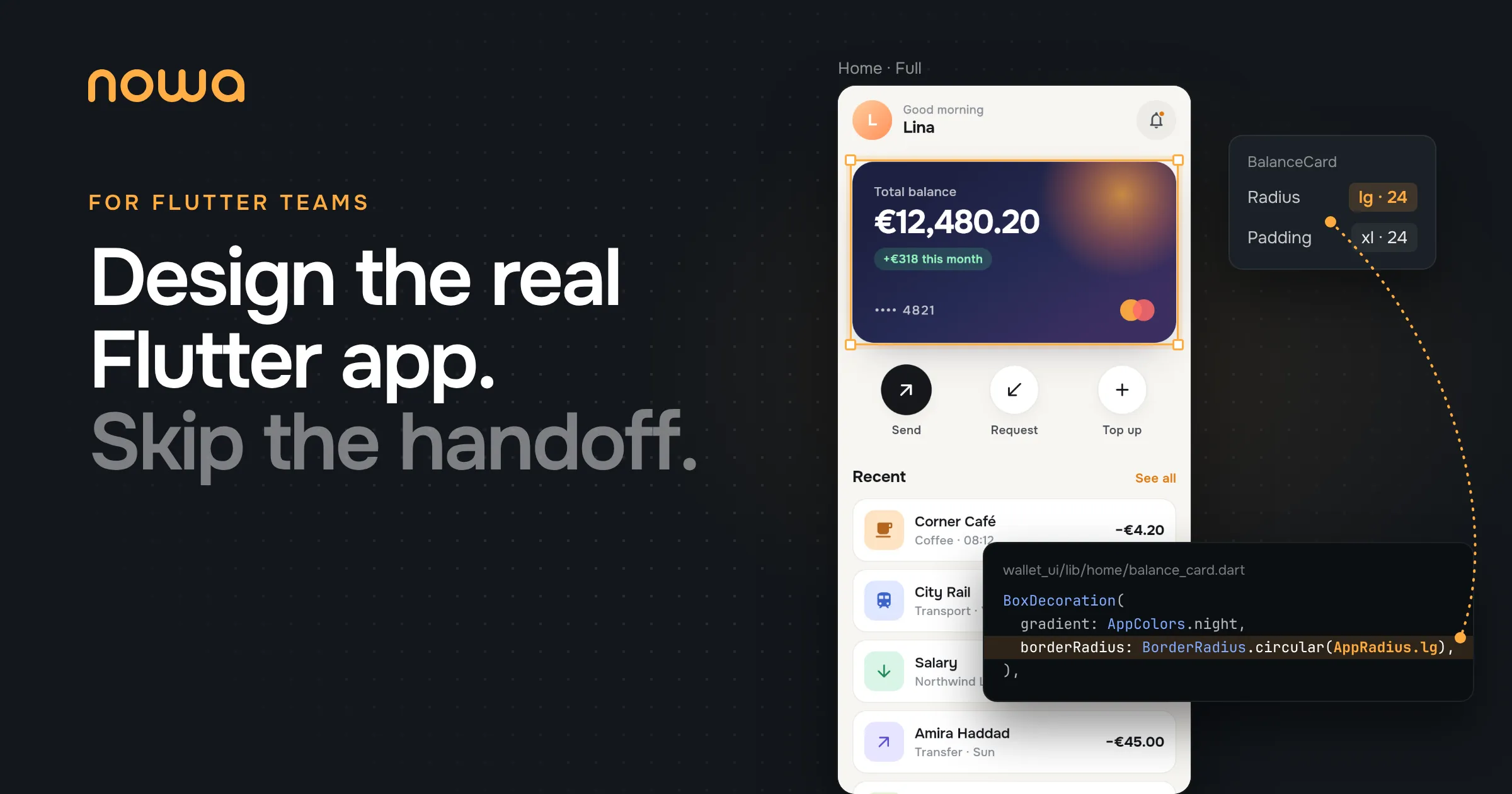
Now a visual edit. The balance card’s corner radius comes from a theme token, so changing it means picking another token from a list:
AppRadius.sm redraws every state of the card at once.Saving changes one line of balance_card.dart:
decoration: BoxDecoration(night,
borderRadius: BorderRadius.lg),
borderRadius: BorderRadius.sm),
boxShadow: AppShadows.card,
),That diff is the handoff. Nobody rebuilds the screen from a spec. (The first save of a hand-written widget makes a larger diff; the FAQ explains why.)
Want to see a designer’s whole week this way, from the theme to the commit? Here’s Flutter for Designers, step by step.
What a static frame never let you design
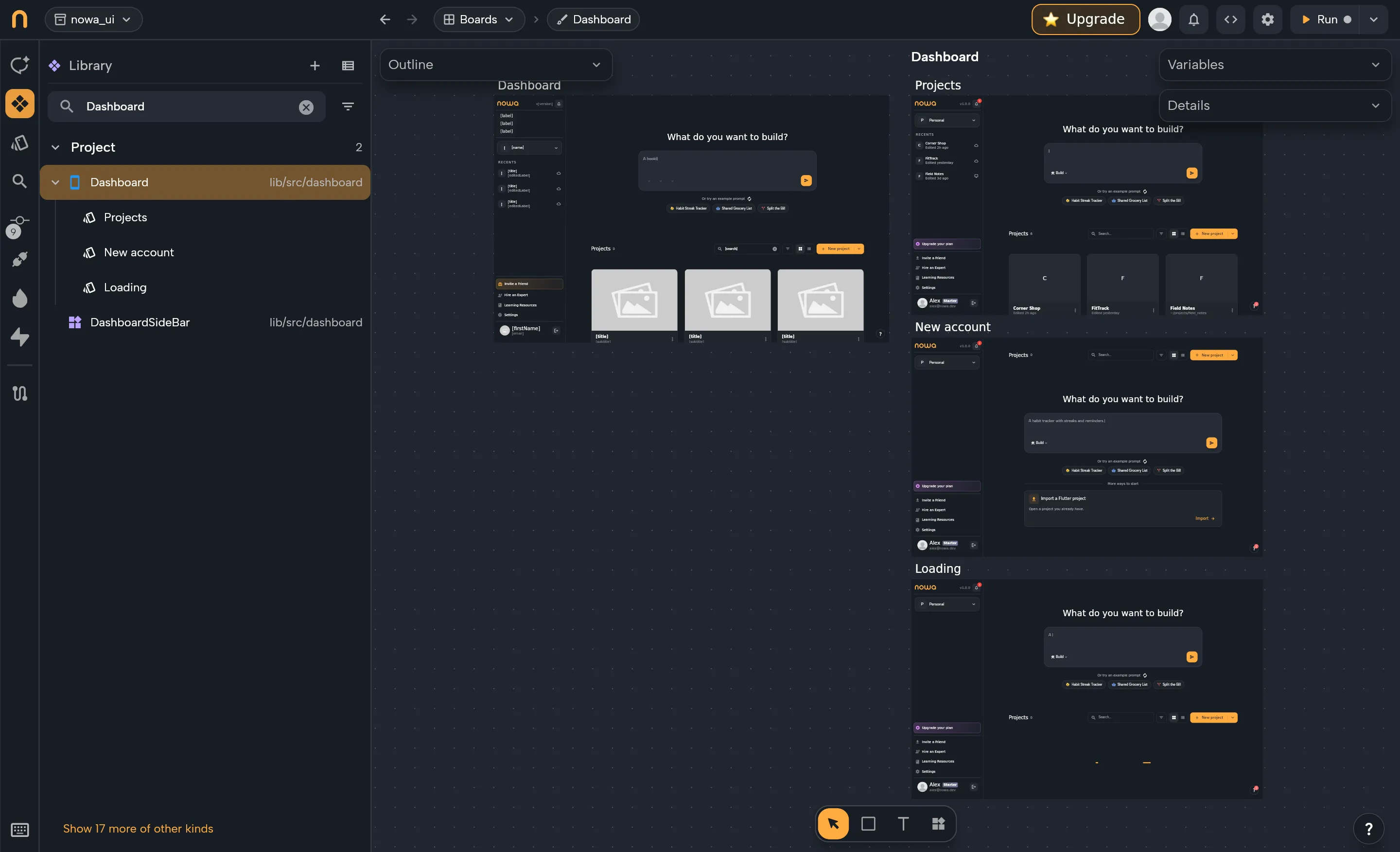
Every state, not just the happy one. Loading, empty, error and full each live in a design file as a preview, with the same @Preview annotation Flutter’s own Widget Previewer uses. A developer or your agent writes each state once, in a few lines of mock data. Nowa then shows them side by side, so the empty state gets the same care as the hero shot, along with the long names and large balances that break layouts.
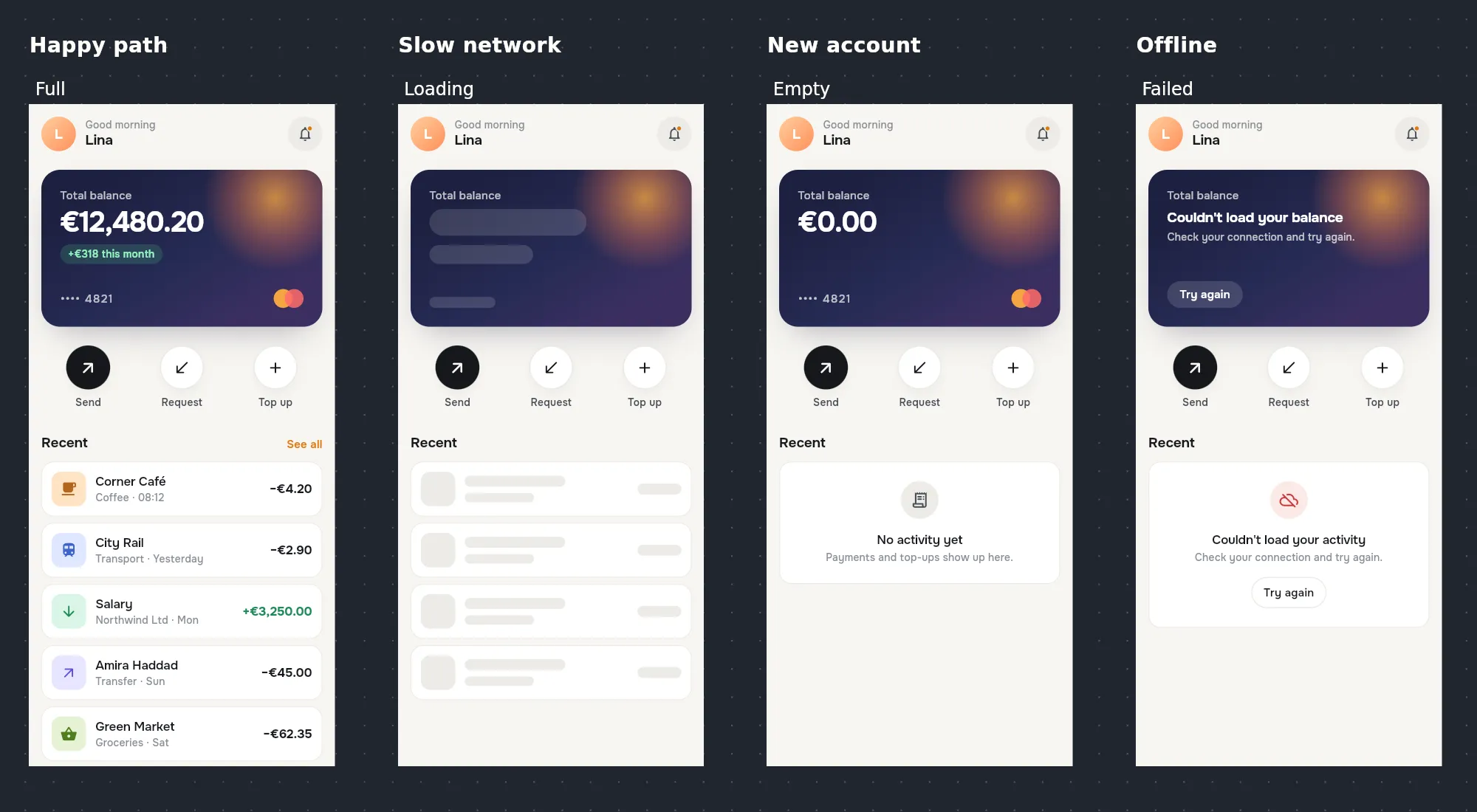
Prototypes built from the real widgets. Behavior has always been the hard part: in a 2008 survey of 259 designers, 86% said it’s harder to prototype than appearance. In Nowa you press Play on any state and click through it with mock data. The prototype uses the same widgets the app ships, so there’s nothing to keep in sync.
Your design system, straight from code. Your theme’s colors and text styles, including your own theme extensions, appear as tokens in Nowa’s pickers. Pick one and the code references the token, not a hex value.
Motion. Add Rive or Lottie files and Flutter’s implicit animations, tune their durations, and play them on the canvas. Or describe the motion to your agent and watch it run.
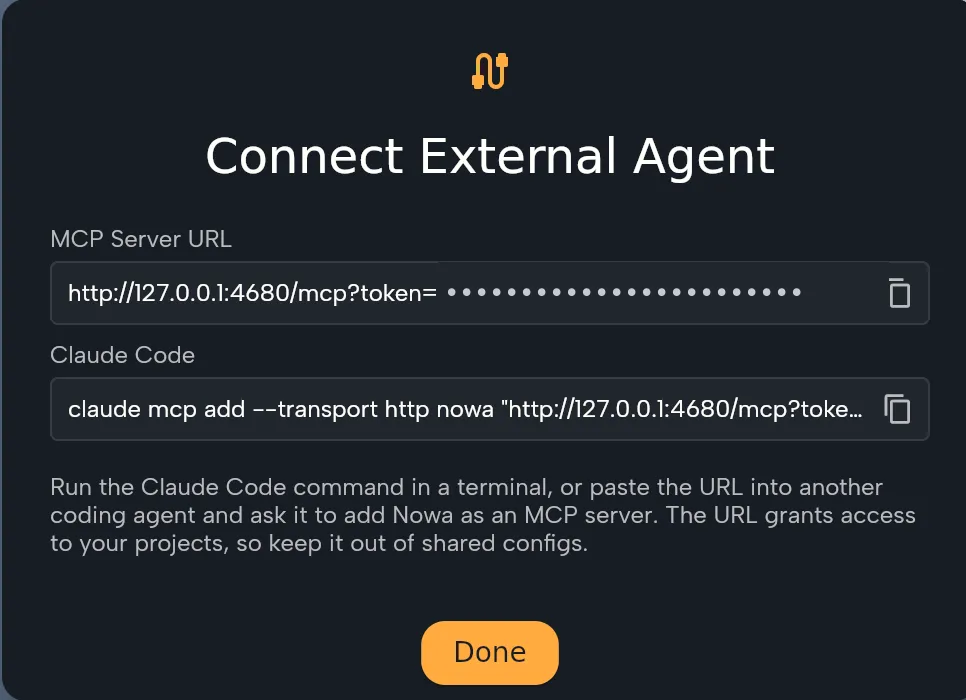
Your own AI agent, with full visual control. Nowa runs a local MCP server, so the agent you already use, like Claude Code or Cursor, can read and edit the UI while you watch the canvas change. Select a widget, ask for “calmer and more premium”, then fine-tune by hand. Nowa also tells every agent who it’s working for. Its instructions include this line: “The user is usually a designer who cannot fix code: never break their app.”
Comments your agent can act on.Coming soon Pin feedback on any screen or widget, for a teammate or for your AI agent, and let the agent work through every open comment in one pass.
Live collaboration.Coming soon Designers, developers and product managers working on the same screen at the same time.
Everything else in this section works today in Nowa’s desktop app for macOS and Windows. Git and the agent connection depend on your plan.
PureUI: how designers stay out of the logic
“Wait. Designers in our codebase?”
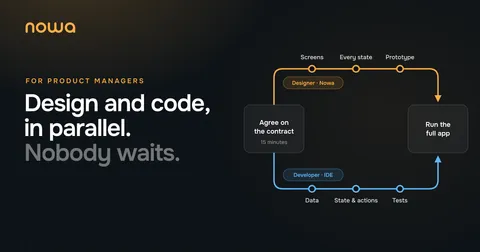
That’s the first question every developer asks, and it’s a fair one. Our answer is a way of structuring a Flutter app that we call PureUI. The app is split in two. One package holds everything people see, and designers own it. The rest of the app holds everything it does, and developers own it. A short contract per screen, describing what it shows and what people can do there, connects the two.

Think of the contract as a wall socket. Agree on the shape of the plug, and both sides can work at the same time without waiting for each other.
The rules are short:
- The UI package never imports the rest of the app. It doesn’t list the app as a dependency, and a lint rule set to error (
depend_on_referenced_packages) catches any import that slips in. - Every widget renders on its own, from mock data. If it can’t render on a board, it isn’t pure.
- The contract is the only place the two meet.
For the developers reading, here’s the data half of the contract for the wallet app’s home screen:
/// The balance card.{
this.total = '',
this.monthlyChange = '',
this.trend = BalanceTrend.up,
this.cardNumber = '',
this.loading = false,
this.failed = false,
});
/// "€12,480.20".
final String total;
/// "+€318 this month". Empty hides the chip.
final String monthlyChange;
final BalanceTrend trend;
/// The linked card, masked: "•••• 4821".There are no colors, fonts or business objects in it. The balance arrives as text that’s ready to show, and flags like loading and failed make every state designable. Next to it, a HomeActions class lists what the user can do, as callbacks named after their intent: send, retry, topUp. Leave an optional one out, and Home hides its button. In Nowa, designers open just the UI package, and the Details panel shows a feature’s data, actions and slots right next to its layout.
None of this is exotic. Flutter’s own architecture guide calls separation of concerns “the most important principle to follow when designing your Flutter app,” and says views “shouldn’t contain any business logic.” PureUI takes that advice far enough that a designer can work safely on one side of the line, with whatever state management you already use. In an existing app, you get there one feature at a time, and during the pilot we do the first split together. For the full architecture in code, from the contract to the glue in your app, see Separate UI From Logic in Flutter.
It’s also how we build Nowa itself. All the UI work on the editor happens in one package, with its own boards and design files, and that package can’t touch the logic.
Design and code in parallel
Today, design and development run like a relay. Design hands over the baton, development hands back a build, design files tickets, and around it goes.

With a contract, you agree on it first, usually in one short conversation. Then design and logic run side by side, and a few lines of host code connect them. Need something the contract doesn’t have yet, like a cashback badge? The designer, or their agent, adds the field as optional, with a default and a mock value. The app still compiles, and the pull request shows a developer exactly what to wire up.
For product, that means reviewing the real UI instead of screenshots, and an app the whole team can click through with mock data before the backend is ready. Here’s what that week looks like for a PM.
Want to see it on one of your own features? Book a demo.
When Figma is still the right tool
We’re not telling you to delete Figma. It’s great for early exploration, moodboards, marketing visuals and whiteboarding, so keep it for that. When a direction wins, your agent can read the frame through Figma’s MCP server and build it once on your real widgets through Nowa’s. From then on, design it in the app. That’s where it will live anyway.
Join the pilot
We’re running a discounted pilot with a small group of Flutter teams. It starts with a 30-minute demo. Then we pilot Nowa on one of your own Flutter apps: we split the UI from the logic on a first feature together, and measure the difference with you, in review rounds per screen and days from design to merged.
Pilot teams also shape the product. Their feedback decides what we build next.
As an official Flutter partner, we work directly with the Flutter team at Google, so bring your hardest Flutter questions too.
Book a demo →
FAQ
Can Figma export designs to Flutter code?
Not natively. Dev Mode’s snippets cover CSS, iOS and Android, Code Connect has no Flutter integration, and Figma Make builds React. Plugins and AI agents can generate Flutter from a frame, but someone still reviews it and wires it in. Nowa skips the export: designers edit the Flutter UI directly.
Can Claude Code or Cursor turn Figma designs into Flutter?
Yes, through Figma’s MCP server, usually run by a developer and starting from a mockup. With Nowa’s MCP server, the agent a designer already uses edits the Flutter UI itself, and the designer refines the result visually.
Is there a Figma for Flutter?
That’s what we’re building. Instead of a separate design file, Nowa’s canvas renders your Flutter code, so you’re designing the code that ships.
Do designers need to know Flutter or Dart?
No. They design visually on the real UI, or with their own AI agent through the Nowa MCP. Knowing how Flutter lays things out helps, and it comes quickly when you can see the real widgets.
Can designers break the app’s logic?
Not from the UI package. It doesn’t import the rest of the app, so what a designer changes there can’t reach the logic. Nowa doesn’t lock designers into that package, so add a CODEOWNERS rule if you want it enforced. Either way, every change arrives as a commit your team reviews.
What does the code look like after a designer edits it?
Regular Flutter widgets, formatted with dart format at your project’s line width. Declarations nobody touched stay as they were. The first time Nowa saves a hand-written widget, it normalizes that widget: it adds a @NowaGenerated annotation and an import of our nowa_runtime package (add it to your UI package with flutter pub add nowa_runtime), and applies a few house rules, such as writing 16 as 16.0 and dropping plain // comments inside the widget. Expect one larger diff per widget, then small ones. Nowa also adds a .nowa folder and boards files to the repo. Our docs list every change.
Does our code leave our machines?
Not with a local project, unless you send it to us yourself, for example by attaching a snapshot to a support ticket. Nowa edits the files on your machine, and your repo stays wherever it lives today. If a designer uses their own agent through the Nowa MCP, the code goes to that agent, not to us.
Does it work with our existing Flutter app?
Yes, Nowa works with existing Flutter apps, not just new ones. You import your project or clone it from GitHub, and your design system shows up in Nowa as it is in code. During the pilot, we split UI from logic with your team, starting with one feature. Widgets from packages Nowa can’t render yet show as placeholders on the canvas but run normally in the app. Check what the canvas can’t render yet.
Can we stop using Nowa later?
Yes. It’s ordinary Flutter code in your repo, and it keeps working without Nowa. The Nowa-specific parts are small and easy to spot: the @NowaGenerated annotations, the nowa_runtime import and dependency that come with them, and the .nowa and boards folders.