A while ago, a Fortune 200 company asked us to turn Nowa into a design tool for their designers. Their ask, roughly: let our designers work on the actual Flutter app instead of pictures of it, and keep them away from the logic.
That second part is a question for developers. If you’d be the one saying yes to designers in your codebase, this post is for you. It explains PureUI, the architecture we built for it: how it splits a Flutter app, what the code looks like, and what developers ask us first.
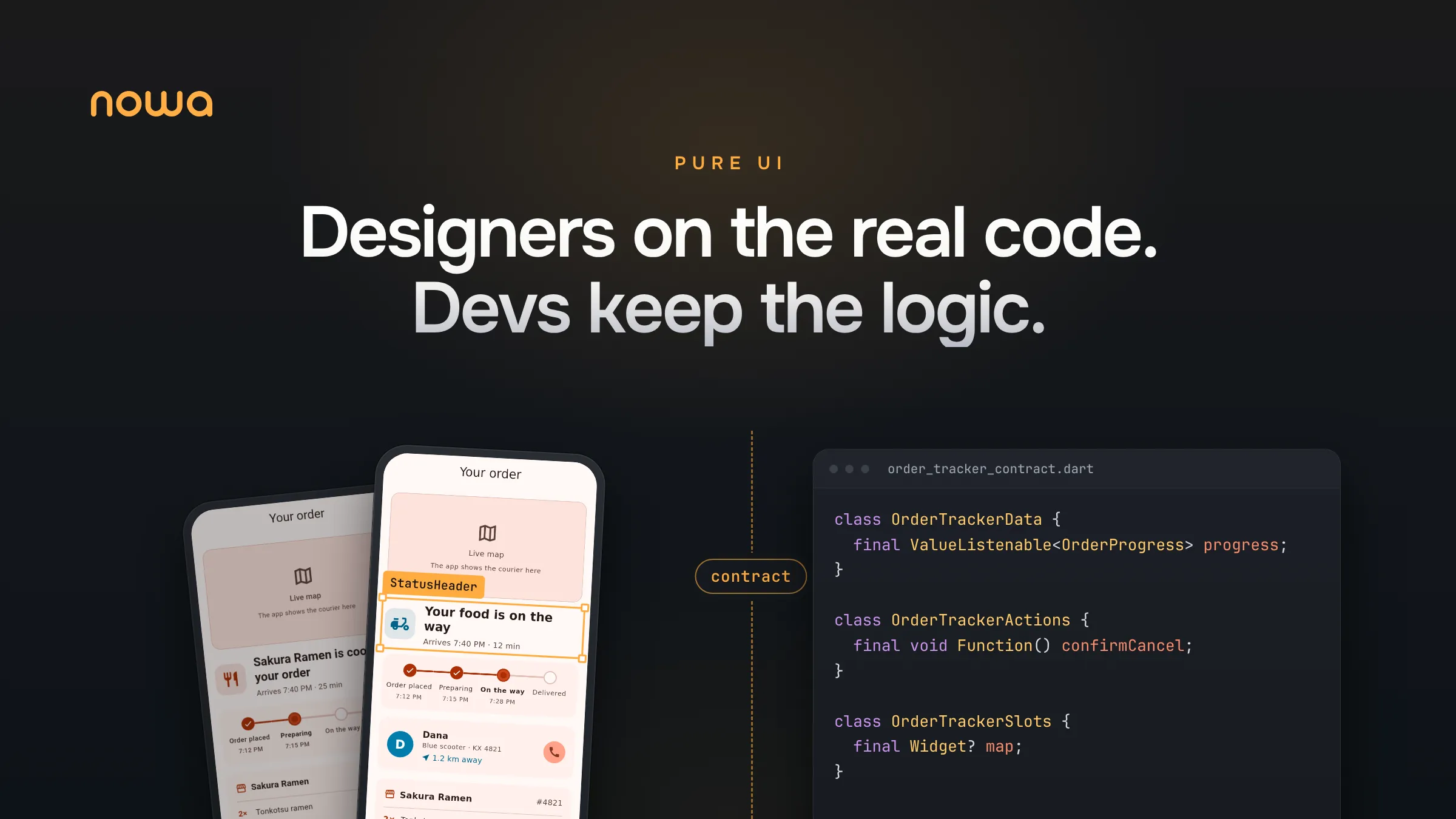
Move your widgets into their own UI package that never imports the app. The UI and the app talk through a small contract per screen: the data the screen shows and the actions the user can take. Designers own the UI package, and you keep everything else, including your state management.
Not the developer on your team? Here’s the guide for designers and the guide for PMs.
Why you can’t hand a normal Flutter screen to a designer
In most Flutter apps, a screen is one widget that does everything. It reads a provider, calls a repository, formats a date, decides when to show a spinner and lays out the pixels, often inside the same build method.
Point a design tool at that and two things go wrong. First, to show the screen, the tool has to run your whole app: the backend, the auth, the API keys. Good luck making the server fail on demand so you can design the error state. Second, a designer moving a button can break the logic. Designers aren’t careless. The button and the API call just live three lines apart.
So the UI needs a place of its own.
PureUI: the UI gets its own package
PureUI is the architecture we built for this. The UI lives in its own package, the logic stays in the app, and the two only talk through a small contract.

The contract has two parts:
- Data: everything the screen shows, as plain values. Text that’s ready to display (“Arrives 7:40 PM · 12 min”), simple values like “on the way”, and flags like “loading” or “failed”.
- Actions: everything the user can do, as plain functions. Cancel the order, call the courier, reorder.
Data flows down into the UI, and actions flow back up to the app. If you know MVI (model, view, intent), it’s the same shape: the data is your state, the actions are your intents, and the screen never reaches into whatever handles them. There’s also a rarely used third part called a slot, for things the UI package can’t draw itself, like a live map. The app fills it in.
We built it around three beliefs:
- Developers should own the logic, all of it. Data, state management, APIs, tests and tools. A design tool has no business telling you how to build your app, so Riverpod, Bloc or plain
setStatestays your call. - Nobody should wait for anybody. Designers shouldn’t wait for a build to see their work, and developers shouldn’t wait for a final design to start.
- Your repo should be the only source of truth. No design file to keep in sync. The UI the designer works on is the UI that ships.
This is also where Flutter’s own advice points. Its architecture guide calls separation of concerns “the most important principle to follow when designing your Flutter app,” and says your app should split into two layers, UI and data. PureUI takes that one step further and puts the views, the widgets themselves, in their own package. The split isn’t a convention people have to remember on a Friday afternoon. The project structure enforces it.
We like it enough that we’re moving Nowa’s own UI to it, one panel at a time.
What the contract looks like in code
Our example is Bite, a pretend food delivery app, and its order tracker: the screen you stare at while you wait for dinner. It has loads of states, a confirmation before cancelling, a courier who keeps moving and a live map. Maya, the designer, works on it in Nowa. Omar, the developer, works in VS Code.
On Monday morning, Maya and Omar answer two questions together: what does this screen show, and what can the user do on it? The answers become the contract file, order_tracker_contract.dart, in the UI package. It takes about 15 minutes. Here’s a trimmed-down sketch:
// Data: what the screen shows
class OrderProgress {
  final OrderPhase phase;   // placed, preparing, onTheWay, delivered...
  final String headline;    // "Your food is on the way"
  final String? etaLabel;   // "Arrives 7:40 PM · 12 min"
  final bool canCancel;
}

// Actions: what the user can do
class OrderTrackerActions {
  final void Function() askCancel;
  final void Function() reorder;
  final void Function()? callCourier;
}
Plain Dart classes on one side, plain Flutter widgets on the other. The full file splits the data into progress, courier and receipt:
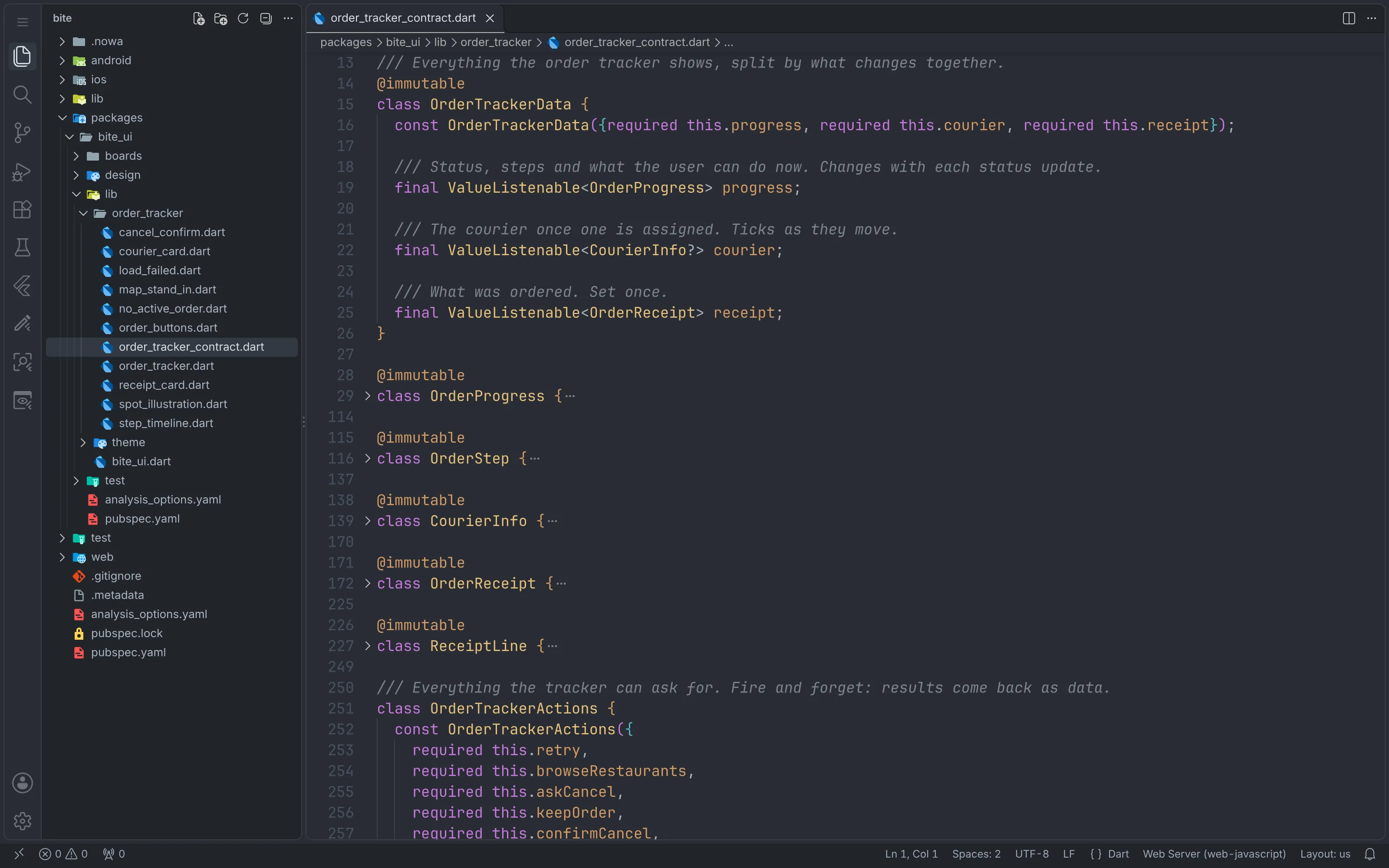
The contract can change later, with one rule. Designers may add optional fields on their own, with a mock value, because an optional field keeps the app compiling. Renaming or removing things stays a conversation.
Two rules that keep designers out of your logic
The UI package never imports the app. A widget can’t reach a provider or a repository, because there’s nothing to call. One tip: in a pub workspace, Dart can still resolve an import between packages, so set depend_on_referenced_packages: error in the UI package’s analysis_options.yaml and CI will catch a stray import.
Every widget renders from mock data alone. If it needs the backend to show up, it isn’t pure UI yet. Next to the widgets, the UI package has a design file with mock data for every state the screen can be in. Each state is a regular Flutter @Preview, the same annotation Flutter’s own widget previewer uses:
@Preview(group: 'Order tracker', name: 'Failed', size: Size() => OrderTrackerPrototype(progress: mockOrderFailed()); In return, Nowa’s canvas only ever renders the UI package, fed with mock data, and your app’s logic stays a black box to it.
Designers can still ship a broken layout, like anyone, which is why every change goes through your normal pull request review. A CODEOWNERS file that sends UI package changes to designers and contract changes to both sides works nicely.
Wiring the UI to your app: a mapper and a host
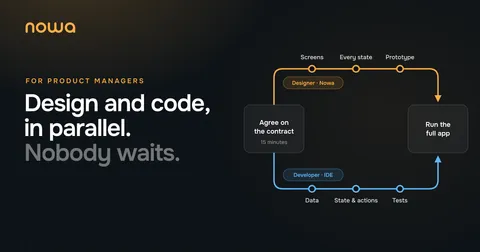
Once the contract is agreed, both sides start the same morning and work in parallel:

Omar never opens Nowa. VS Code, the usual AI agent, the simulator and the tests are all Omar needs. And no UI work, because the UI isn’t Omar’s job anymore.
The job is turning Bite’s backend data into the contract’s data, and the contract’s actions into real calls. That takes two small pieces in the app:
- A mapper: a plain function that turns the backend’s order into the data the screen shows. All the date and money formatting lives here.
- A host: a small widget that listens to the app’s state (Riverpod, Bloc, plain notifiers, whatever the team uses) and hands the data and actions to Maya’s widget.
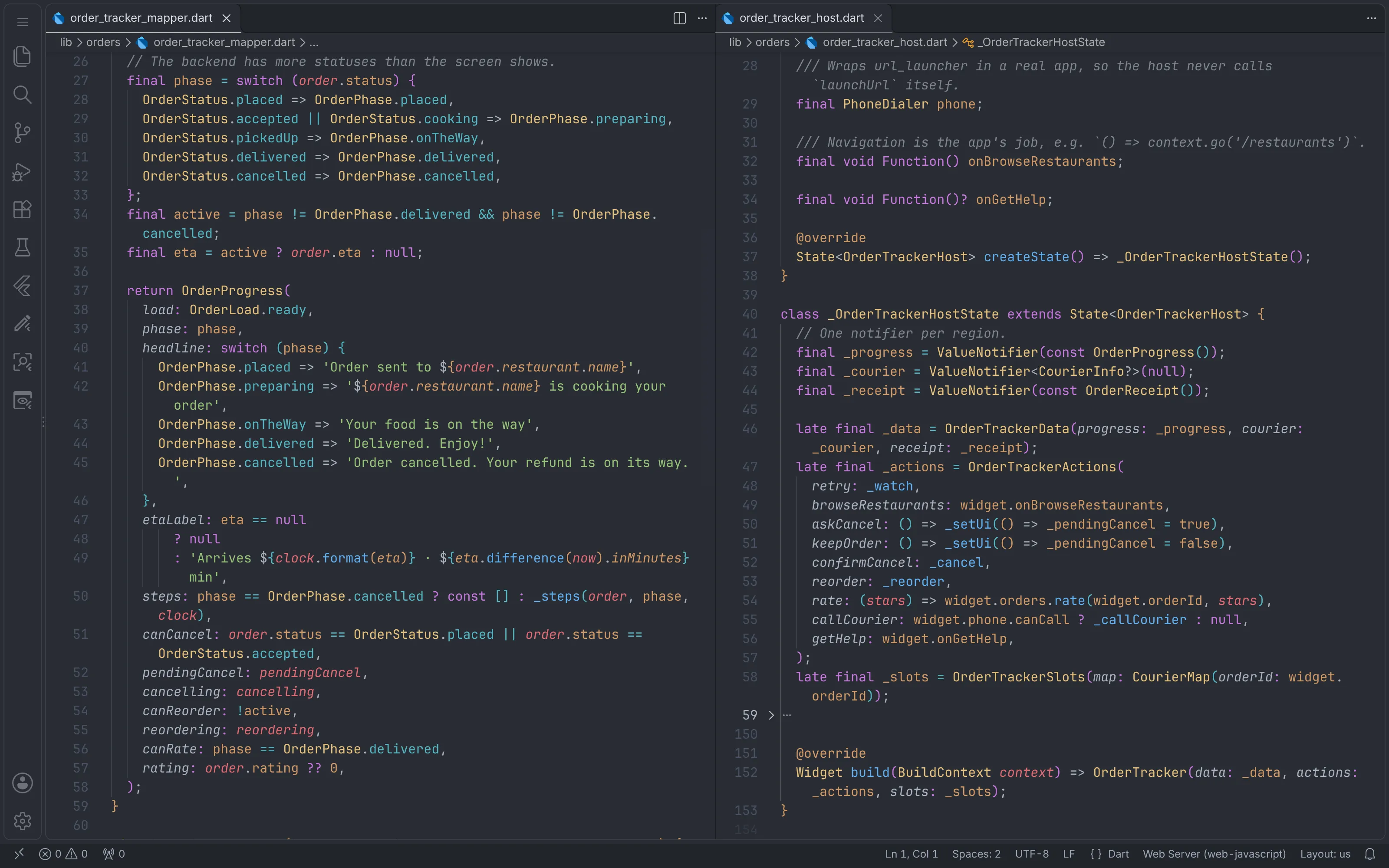
The host’s build method is one line:
@override
Widget build(data: _data, actions: _actions, slots: _slots); If Omar ever feels the urge to add a Padding there, that’s a design question, and it belongs to Maya.
Midweek, Maya adds the customer’s delivery note to the receipt (“Leave it at the door, the dog is friendly”) as a new optional field in the contract. When Maya’s branch lands, Omar hooks the note up with one line in the mapper, runs the tests and pushes:
subtotalLabel: money.order.subtotal),
deliveryFeeLabel: order.deliveryFee == 0 ? 'Free' : money.order.deliveryFee),
totalLabel: money.order.total),
addressLabel: order.address.oneLine,
note: order.deliveryNote,
);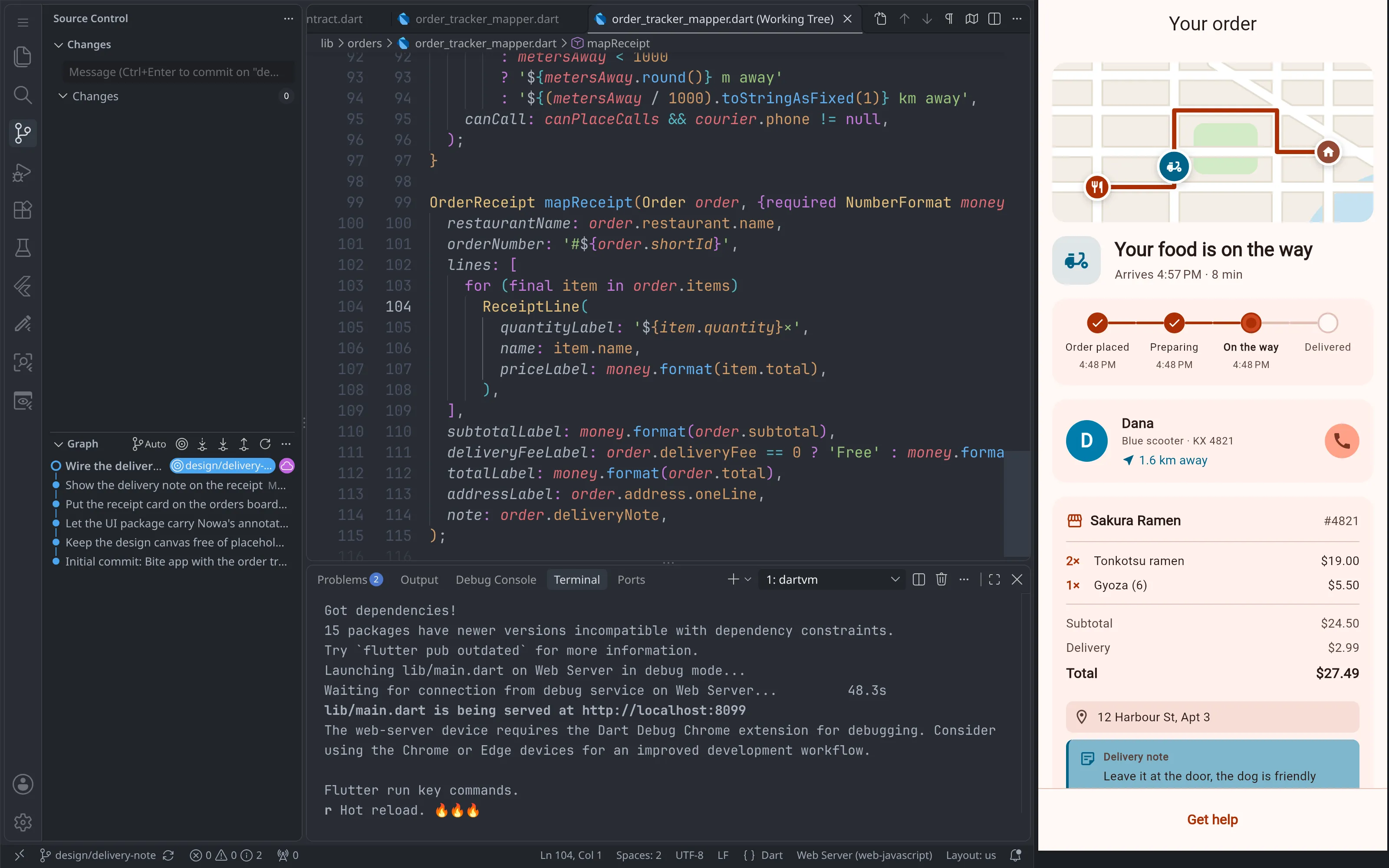
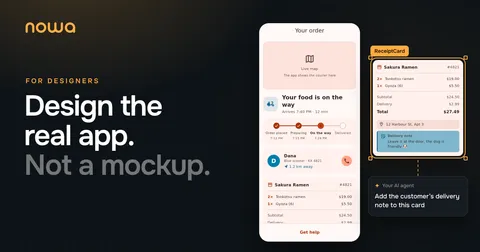
Then anyone on the team can pull both sides and run the full app. In Nowa, Run builds your actual app with the normal Flutter toolchain, the same way flutter run does. It’s the one time Nowa runs your logic. The order moves from preparing to on the way by itself, the courier crawls across the map, and the delivery note comes from the order instead of a mock:
What a designer’s pull request looks like
On Thursday the status icon looks too small. Maya changes it, commits it and opens a pull request. Omar isn’t blocked and doesn’t need to know until the pull request shows up. The diff only touches the UI package:
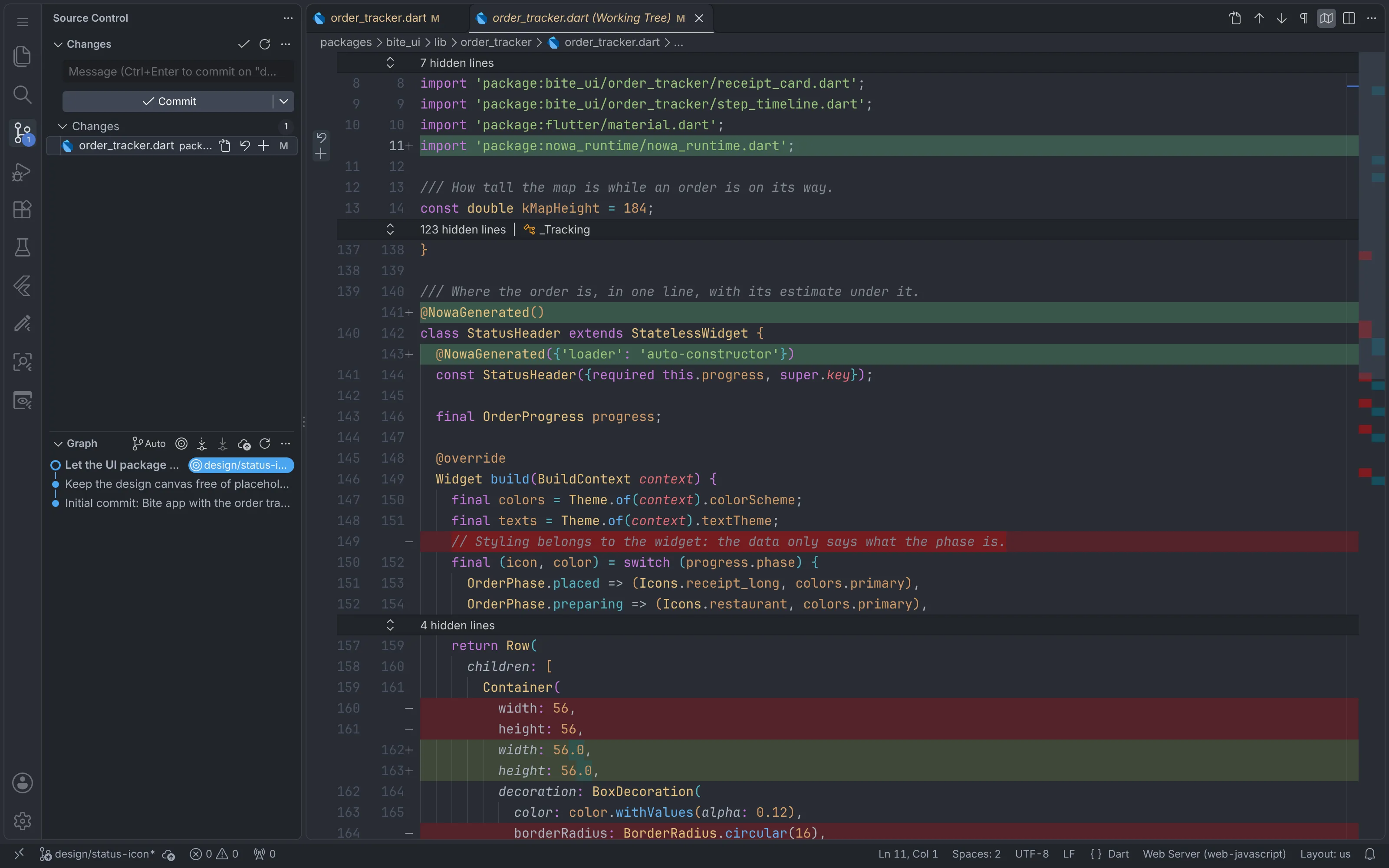
The code is plain Flutter: Material widgets, your theme, StatelessWidgets. Nowa doesn’t ship a widget kit you have to use.
Nowa does leave one mark, and you should know about it. When a designer edits a widget, Nowa adds a @NowaGenerated annotation to it and imports nowa_runtime, a BSD-licensed package on pub.dev that you add to the UI package once. The edited widget is also rewritten in Nowa’s formatting style (16 becomes 16.0, for example), so the first edit of a hand-written widget shows a bigger diff than the change itself, and a comment inside the rewritten method can get lost. Code nobody edited stays byte for byte. Our docs list every change.
Questions developers ask us
Is the canvas exactly what ships?
Very close. The canvas draws your widget code with Flutter through Nowa’s own runtime, and Play runs it live on mock data. A widget from a package Nowa doesn’t support shows up as a labeled placeholder, and the inline preview carries a small note that it isn’t 100% accurate. When you want to be sure, Run builds the actual app.
Do we have to change our state management?
No. The UI package only knows plain values and functions. The host is yours, so Riverpod, Bloc, Provider, signals or setState all work.
Where do navigation and dialogs live?
Navigation is an action: the widget says “open the restaurant”, and the app decides how, with go_router or anything else. Dialogs, empty states and errors are UI: the widget draws them from data, like a pendingCancel flag. Hover, an expanded section or half-typed text stay inside the widget and never touch the contract.
How do we test it?
More easily than before. Widget tests and golden tests can reuse the designer’s mocks, and the mapper is a plain function you test with plain asserts. In Bite, the UI package has 18 tests, and they run in a few seconds.
What about AI agents and privacy?
Designers can connect the AI agent they already use, like Claude Code, Cursor or Codex, through Nowa’s MCP server. That server runs on the designer’s own machine and only accepts local connections, and the agent runs under your company’s usual AI accounts and rules.
What if we stop using Nowa?
Your app keeps building, because it’s your Flutter code. You’d be left with some @NowaGenerated annotations (const metadata that does nothing at runtime), the nowa_runtime dependency and two small folders, boards/ and .nowa/.
Does it work with our existing app?
Yes, as a gradual refactor. Import your repo, move one feature’s widgets into the UI package, then add a mapper and a host. The rest of the app doesn’t change. Start with the screen people complain about most. We plan that move with your team during onboarding.
Try PureUI on one screen
Pick the screen your team rebuilds most and try PureUI there. If you stop, you keep a cleaner feature and a pile of fast tests. If it sticks, your designers stop sending padding fixes and start committing them.
Want the same week from the designer’s side? Here’s Maya’s walkthrough. And if you’d like to see PureUI on your own app, I’d love to show you.
See Nowa for Flutter teams →
Happy building,
Anas